We use cookies to make your experience better.
To comply with the new e-Privacy directive, you agree to the privacy policy and our use of cookies.

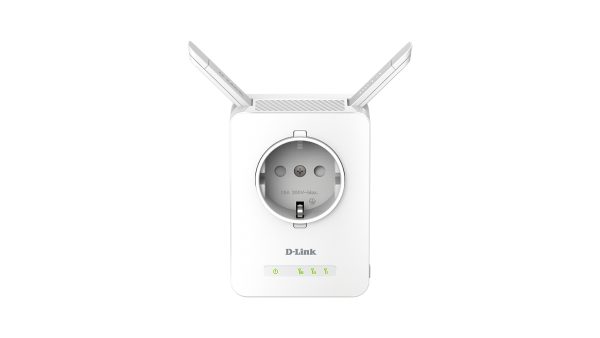
D-Link WI-FI RANGE EXTENDER 300MBPS 2.4GHz, 802.11n/g/b, POWER PASSTHROUGH, 2x EXTERNAL ANTENNAS, 10/100 LAN, LED SIGNAL INDICATOR, UNIVERSAL, UK PLUG

Login for Pricing
SKU: DAP-1365/BAU
In Stock:
6 available
Delivery Time 5-7 Days
D-Link DAP-1365, 10,100 Mbit/s, External, 10/100Base-T(X), IEEE 802.3u, 802.11b, 802.11g, Wi-Fi 4 (802.11n), 300 Mbit/s
- 10/100Base-T(X)
- Wi-Fi Single-band (2.4 GHz) 300 Mbit/s 802.11b, 802.11g, Wi-Fi 4 (802.11n)
- White
Category: Network Extenders
| SKU | DAP-1365/BAU |
|---|---|
| Manufacturer | D-Link |
| Availability | In Stock |
| Performance | |
|---|---|
| Ethernet LAN data rates | 10,100 Mbit/s |
| WPS push button | Yes |
| Antenna | |
| Antennas quantity | 2 |
| Antenna type | External |
| Network | |
| Cabling technology | 10/100Base-T(X) |
| Networking standards | IEEE 802.3u |
| Wi-Fi | Yes |
| Wi-Fi standards | 802.11b, 802.11g, Wi-Fi 4 (802.11n) |
| Wi-Fi data rate (max) | 300 Mbit/s |
| Wi-Fi band | Single-band (2.4 GHz) |
| Security algorithms | WPA, WPA2, WPS |
| Ports & interfaces | |
| Ethernet LAN (RJ-45) ports | 1 |
| Design | |
|---|---|
| Product colour | White |
| LED indicators | Yes |
| Reset button | Yes |
| Certification | FCC, CE, C-Tick, CB, LVD, WPS Setup |
| Power | |
| AC input voltage | 110-240 V |
| AC input frequency | 50 - 60 Hz |
| Power consumption (max) | 2.8 W |
| Operational conditions | |
| Operating temperature (T-T) | 0 - 40 °C |
| Storage temperature (T-T) | -20 - 65 °C |
| Operating relative humidity (H-H) | 10 - 90% |
| Storage relative humidity (H-H) | 5 - 95% |
| Weight & dimensions | |
| Width | 92 mm |
| Depth | 67 mm |
| Height | 59.5 mm |
| Weight | 144.3 g |
The DAP-1365 is a portable plug-in Wi-Fi range extender that lets you extend an existing wireless network. You can place it within your home’s existing Wi-Fi network to increase its range. Its power passthrough design ensures that your electrical outlet remains available to power another electrical appliance.
More than Just a Wi-Fi Extender
Wireless N technology helps to extend wireless range in your home or office and also provides backward compatibility with older wireless devices in your network, allowing you to enjoy a fast, reliable wireless connection. Alternatively, use the built-in Fast Ethernet port to create a personal Wi-Fi hotspot in hotel rooms with wired Internet access. You can also add Wi-Fi connectivity to computers, smart TVs and games consoles with Ethernet ports.
Easy to Set Up, Easy to Use
Setting up the N300 Wi-Fi Range Extender is simple. Just use the one-touch configuration function by pushing the WPS push-button on the DAP-1365 and on the router or access point you want to extend, and the DAP-1365 will automatically configure itself for you. Alternatively, you can use the supported QRS Mobile app on your iOS or Android smartphones or tablets to set up the DAP-1365 easily without a computer.
Smart Signal Indicator makes Placement a Snap
The DAP-1365 features a Smart Signal Indicator, which makes finding the optimal location for your Wi-Fi extender quick and easy. It eliminates the guesswork by giving you instant visual feedback on the signal strength, so you can quickly test out multiple locations to find the best placement.
More than Just a Wi-Fi Extender
Wireless N technology helps to extend wireless range in your home or office and also provides backward compatibility with older wireless devices in your network, allowing you to enjoy a fast, reliable wireless connection. Alternatively, use the built-in Fast Ethernet port to create a personal Wi-Fi hotspot in hotel rooms with wired Internet access. You can also add Wi-Fi connectivity to computers, smart TVs and games consoles with Ethernet ports.
Easy to Set Up, Easy to Use
Setting up the N300 Wi-Fi Range Extender is simple. Just use the one-touch configuration function by pushing the WPS push-button on the DAP-1365 and on the router or access point you want to extend, and the DAP-1365 will automatically configure itself for you. Alternatively, you can use the supported QRS Mobile app on your iOS or Android smartphones or tablets to set up the DAP-1365 easily without a computer.
Smart Signal Indicator makes Placement a Snap
The DAP-1365 features a Smart Signal Indicator, which makes finding the optimal location for your Wi-Fi extender quick and easy. It eliminates the guesswork by giving you instant visual feedback on the signal strength, so you can quickly test out multiple locations to find the best placement.
You may also be interested in
| Product |
 D-Link WI-FI RANGE EXTENDER 300MBPS 2....
Login for Pricing
D-Link WI-FI RANGE EXTENDER 300MBPS 2....
Login for Pricing
|
 TP-Link TL-WA860RE network extender Wh...
Login for Pricing
TP-Link TL-WA860RE network extender Wh...
Login for Pricing
|
Hot Product
TP-Link RE200 network extender Network...
Login for Pricing
|
Recommended
TP-Link TL-WA855RE network extender Ne...
Login for Pricing
|
Bestseller
TP-Link AC1200 Mesh Wi-Fi Range Extend...
Login for Pricing
|
Popular
TP-Link RE190 network extender Network...
Login for Pricing
|
|---|---|---|---|---|---|---|
| SKU |
DAP-1365/BAU
|
TL-WA860RE
|
RE200
|
TL-WA855RE
|
RE305
|
RE190
|
| Manufacturer |
D-Link
|
TP-LINK
|
TP-LINK
|
TP-LINK
|
TP-LINK
|
TP-LINK
|
| Type |
N/A
|
N/A
|
Network repeater
|
Network transmitter & receiver
|
Network repeater
|
Network repeater
|
| Product colour |
White
|
White
|
White
|
White
|
White
|
White
|